J74 Assistant Developers Tools + J74 MIDI Assistant: an environment for AI integration with Ableton Live

The J74 Assistant Developers Tools + J74 MIDI Assistant provide an environment for AI integration with Ableton Live.
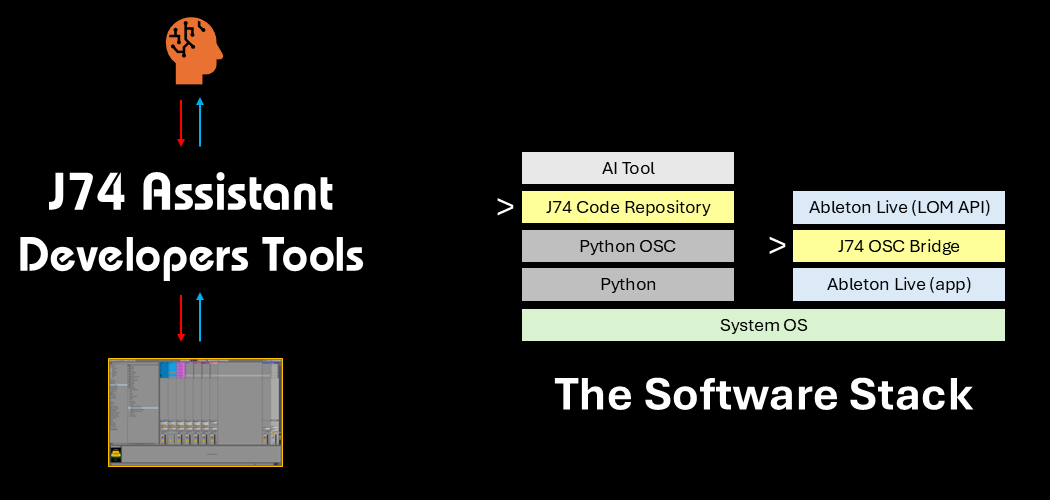
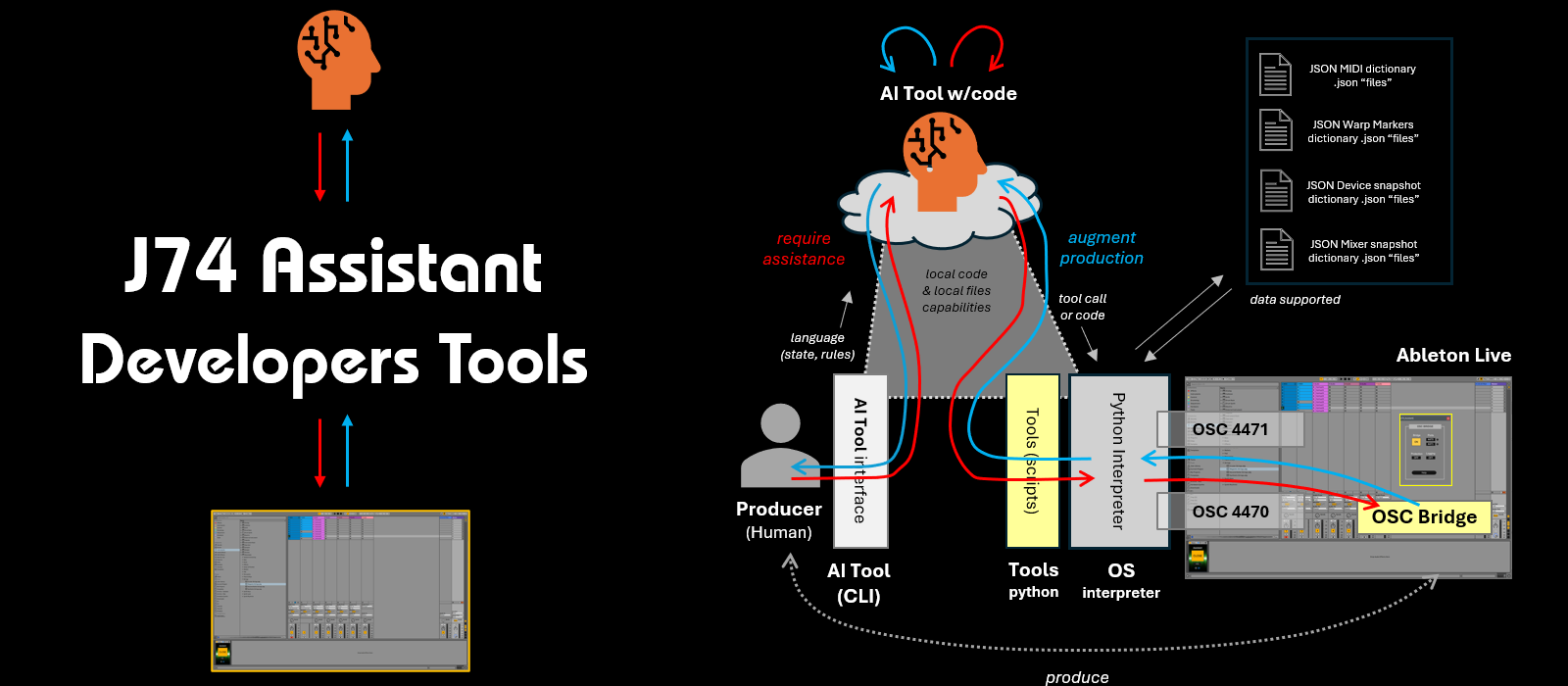
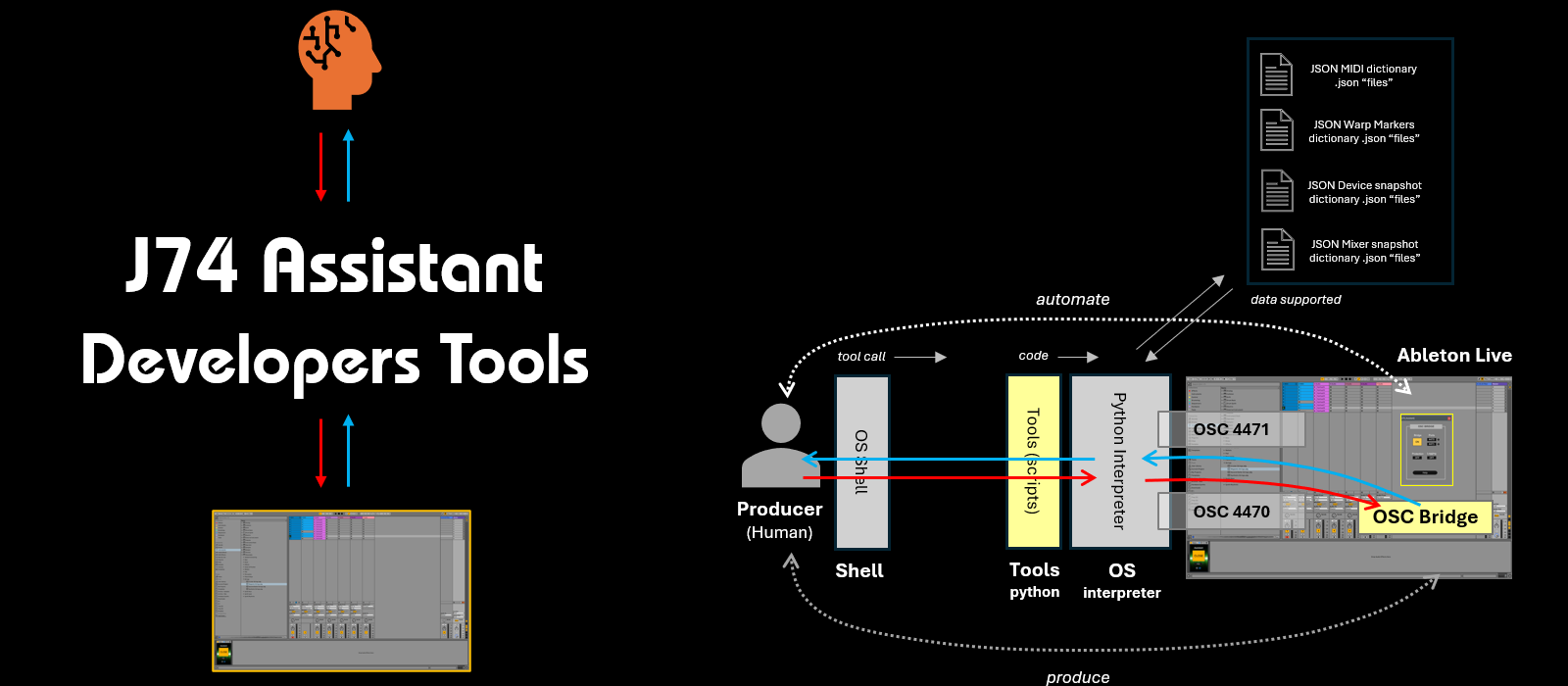
The J74 Assistant Developers Tools is a bridging environment with a deep level of AI integration. It allows a "local-coding-enabled" AI tool (such as Google's Antigravity, Gemini CLI or other functionally equivalent tools) to directly co-work on an Ableton Live project for MIDI clips, audio warp markers, mixer and device snapshots. The package provides connection, rules and methods for the AI to bidirectionally interoperate with Ableton Live API and data sets. The AI is automatically instructed upon starting and can perform the role of assistant straight away, based on the producer's intent expressed in natural language and the AI background knowledge of harmony, melody, rhythm and song structures. The toolset can also be used for automation purposes. For this to be possible a one-off setup procedure and some software installation is required (in case of Google's Antigravity and Gemini CLI, it also requires a valid Google account). The provided documentation explicitly guides you through this process.
Important: these tools require Max for Live support. You must have a Max for Live licence to use them (as in Ableton Live Suite) and they will run properly only in Live 11 or higher (older versions of Live are not supported).
What's the difference?
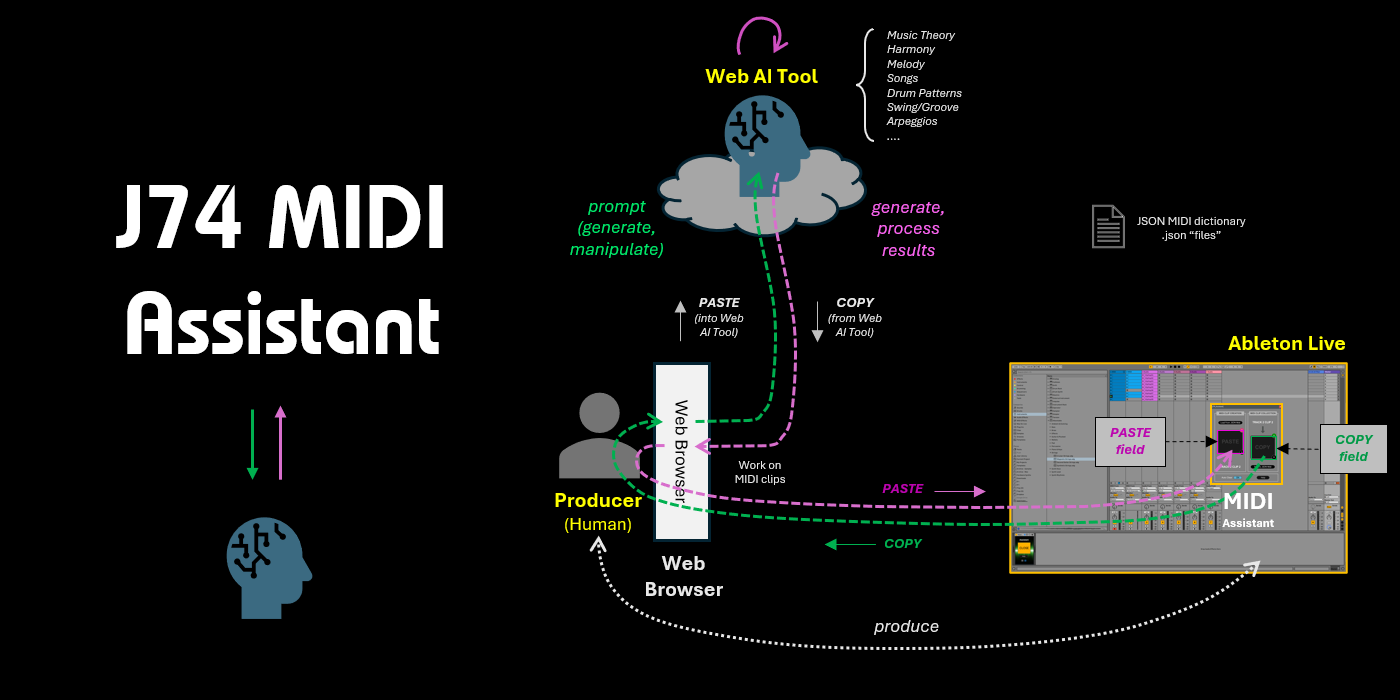
- The J74 MIDI Assistant is a plugin. You use it to exchange MIDI data between Ableton Live and a web AI tool, to generate or manipulate MIDI with an AI. It exports and creates MIDI clips. All through copy & paste. It requires no software integration.- The J74 Assistant Developers Tools is a stack of software. It let's you use an advanced AI tool (Google's Antigravity and Gemini CLI) directly as an assistant. The AI tool can see your project, can analyse it and can work on it (on your request). The AI workflow covers MIDI clips, warp markers and mixer & device snapshots. It requires software integration for the AI tool (Google's Antigravity or Gemini CLI).
You can see these tools as complementary. One is a simple plugin, for quick MIDI-only AI conversations. The other is a platform with deep AI integration, but it requires interaction with a separate AI tool.
Get the J74 Assistant Developers Tools + J74 MIDI Assistant
The J74 Assistant Developers Tools + J74 MIDI Assistant packages can be purchased together for 24 EURO using the buy button below. Once your order will be completed you will get a download link from the Paypal confirmation page. An email with a link to the download will be also sent to you separately, within 24 hours from the purchase.
Feature Overview of J74 Assistant Developers Tools
- Bidirectional LOM API integration over OSC
- Python methods for all LOM API core methods
- Python methods for data structures and generative methods
- AI Work-flow directives (AI learning, AI is immediately ready to perform assistance)
- Support for MIDI clip generation, analisys and processing (symultaneous on multi-track if required)
- Support for Warp Markers in audio clips generation, analisys and processing
- Support for Device snapshots (collect, restore, interpolate, randomize)
- Support for Mixer snapshots (collect, restore, interpolate, randomize)
- Documentation provides Setup and Installation instructions
- Documentation provides Prompt structuring for AI assistance
Here a Quick Overview of J74 Assistant Developers Tools.

For more information about the J74 Assistant Developers Tools look to the detailed J74 Assistant Developers Tools User Manual.
Feature Overview of J74 MIDI Assistant
- Direct [PASTE] functionality (from AI-generated JSON data to MIDI clip)
- Direct [COPY] functionality (from MIDI clip to JSON data for AI processing)
- File import functionality (from JSON file to MIDI clip)
- File export functionality (from MIDI clip to JSON file)
- Documentation provides Prompt procedures for AI generation of MIDI data
- Documentation provides Prompt procedures for AI manipulation of MIDI data
Here a Quick Overview of J74 MIDI Assistant.
For more information about the J74 MIDI Assistant device have a look to the detailed J74 MIDI Assistant User Manual.
Requirements
Platform Requisites:
J74 Assistant tools are Ableton Live, Max for Live packages. You must have a Max for Live licence to run them and they will run properly only in Live 11 or higher (older versions of Live are not supported).
Requirements & Supported Versions:
- Ableton Live 11 and higher (with embedded Max), Suite or Standard *with* Max for Live license
- Windows versions supported: Windows 11 and higher
- Mac OS versions supported: macOS 14 (Sonoma) and higher
- An Internet connection is necessary for the AI tools to work
- A Google account is required to use Google's Antigravity or Gemini CLI
Screenshots